Activate the Airports you service in Limo Anywhere
- Click on the ‘My Office‘ icon in the toolbar.
- Select the ‘Company Resources‘ tab.
- Select the ‘Airports‘ button.
- Click on a RED labeled airport from the ‘Airports‘ list (airport will be highlighted blue).
- Click the ‘EDIT AIRPORT‘ button.
- Change the Other Information’s ‘Status‘ drop down from INACTIVE to ACTIVE.
- Click the ‘UPDATE AIRPORT‘ button.
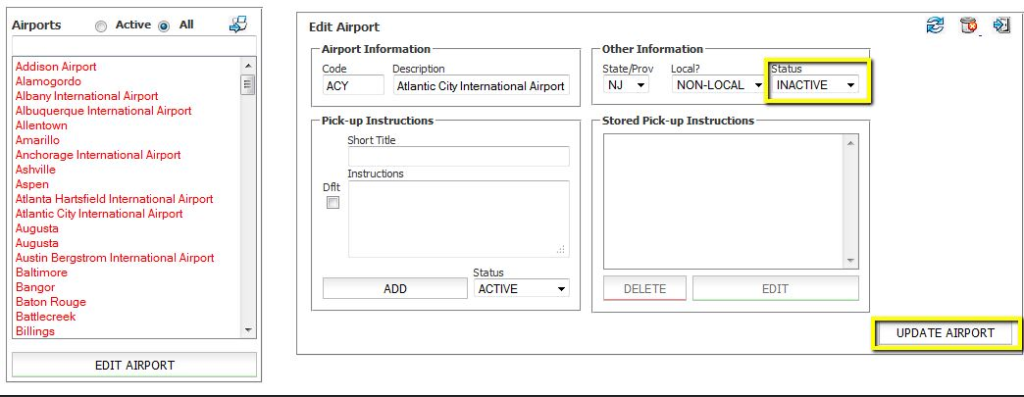
Activate all of the airports you service.
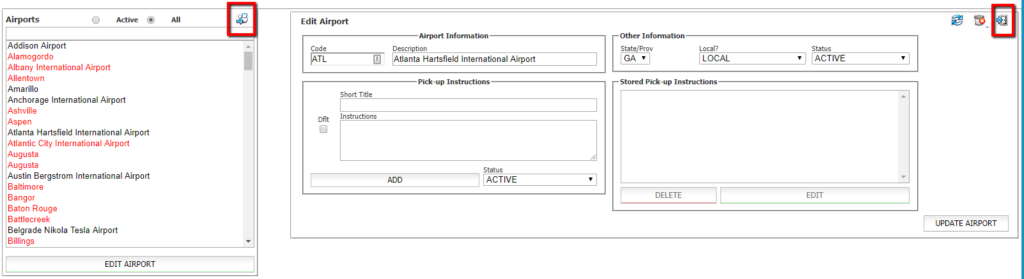
Airports that are not listed here can be added by clicking the Blue Arrow button .
Was this article helpful?
That’s Great!
Thank you for your feedback
Sorry! We couldn't be helpful
Thank you for your feedback
Feedback sent
We appreciate your effort and will try to fix the article