There are situations where you have already created an invoice and need to add more trips to the invoice.
Note: You cannot add trips to a Finalized invoice.
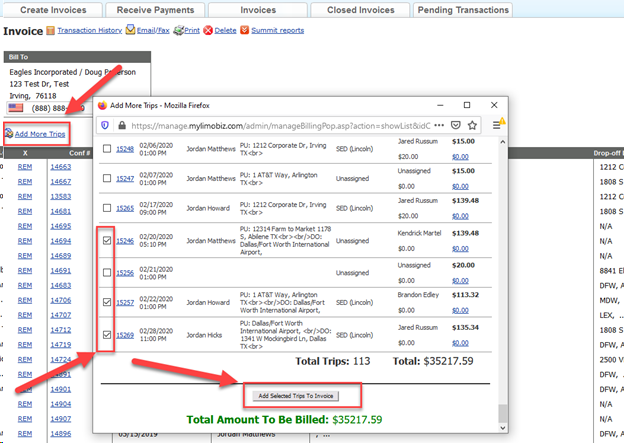
To add more trips to an invoice:
- Open the invoice you want to add trips to.
- Click ‘Add More Trips‘ link.
- The ‘Add More Trips’ screen will pop-up.
- Check which trips you would like to add to the invoice.
- Click ‘Add Selected Trips to Invoice‘.
Was this article helpful?
That’s Great!
Thank you for your feedback
Sorry! We couldn't be helpful
Thank you for your feedback
Feedback sent
We appreciate your effort and will try to fix the article