NOTE: Prerequisite is that drivers are on the Driver Anywhere versions (or later):
- Android 4.6.6
- iOS 4.6.4
We’ve introduced a new Calendar Sync option in the Driver Anywhere (DA) menu, allowing drivers to add their assigned trips directly to their device’s calendar.
Key Details:
- When selected for the first time, the app will request permission to access the device’s calendar.
- Drivers can choose which calendar they’d like to sync their trips to.
- Once confirmed, trips will be added to the selected calendar.
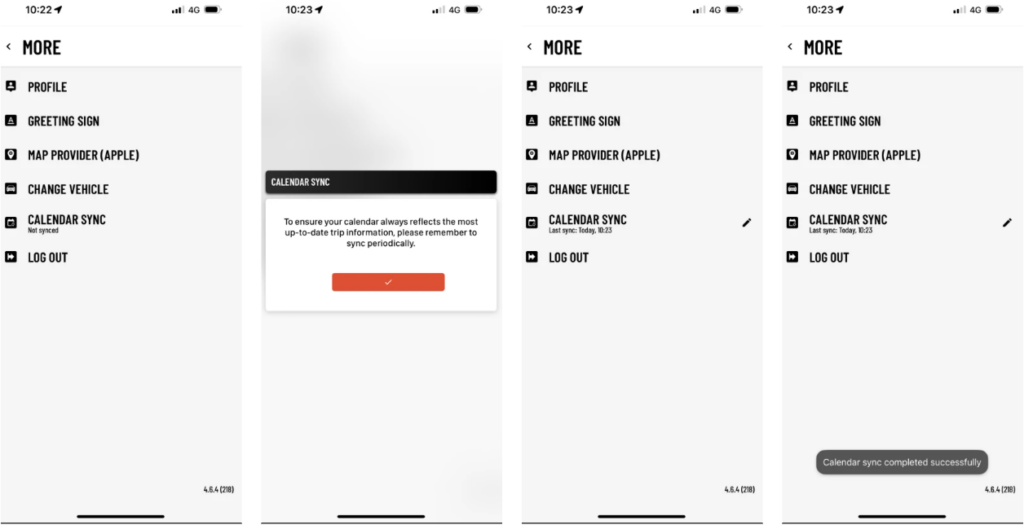
This is a manual sync feature. If there are any updates to existing trips or new trips are assigned, drivers will need to re-initiate the sync process to reflect the latest information.
Was this article helpful?
That’s Great!
Thank you for your feedback
Sorry! We couldn't be helpful
Thank you for your feedback
Feedback sent
We appreciate your effort and will try to fix the article