The Role of Companies In Limo Anywhere
Often large companies or organizations may have multiple Passengers, Booking Contacts, and Billing Contacts which in Limo Anywhere are separate Accounts. A Company name is used to create a method to link multiple accounts.
Before we begin it is important to remember a few important terms as they apply to Limo Anywhere.
Account – In Limo Anywhere the Account is the record of an individual. An Account can be either a Passenger, a Billing Contact or a Booking Contact.
Billing Contact – This is the person that would receive an invoice for a Passenger(s) that received the service. Billing Contacts can have multiple Booking Contacts or Passengers
Passenger – This is the account type of the person that will ride in the car. A Passenger can be linked with only one Billing Contact.
Passenger – This is the account type of the person that will ride in the car. A Passenger can be linked with only one Billing Contact.
Booking Contact – This is the account type for a person that arranges trips for Passenger(s).
Add a Company
- Click on the ‘Accounts’ icon on the toolbar.
- Open the ‘Companies’ tab.
- Enter the name of the Company.
- Click ‘Add Company’ to save changes.
Assign a Company to an Account
In the Account Info screen select from the drop down list in the Company section as illustrated below.
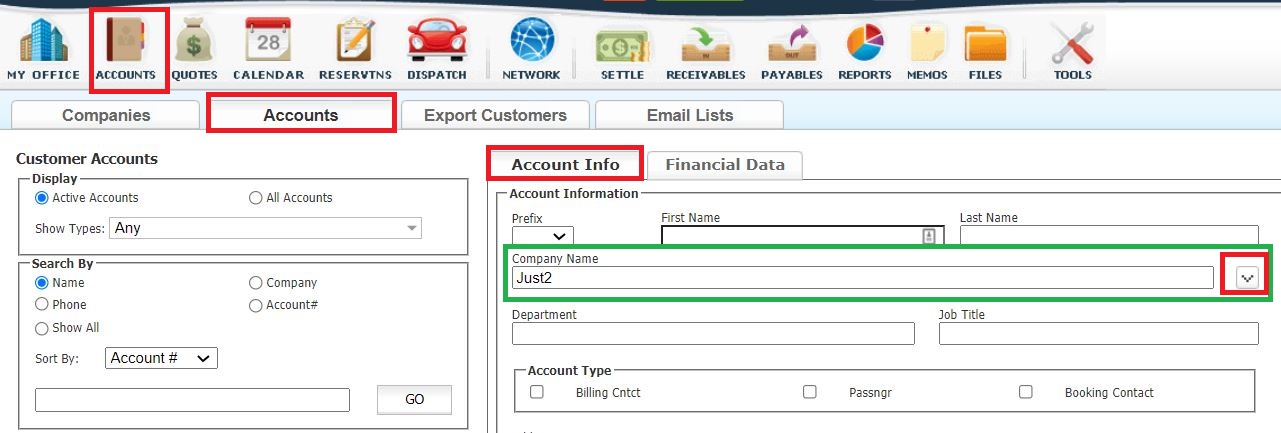
Be sure to click ‘SAVE’ to retain any changes.
Was this article helpful?
That’s Great!
Thank you for your feedback
Sorry! We couldn't be helpful
Thank you for your feedback
Feedback sent
We appreciate your effort and will try to fix the article